How to Read an Engineering Drawing: A Buyer's Guide
By Adil, Managing Director at AMN Engineering · · 9 min read
If you source custom manufactured parts, learning how to read an engineering drawing is one of the most valuable skills you can develop. The drawing is the single document that tells the manufacturer exactly what to make. Every dimension, tolerance, material, and finish requirement is captured on it.
This guide covers the essential elements of an engineering drawing in simple, practical terms, from the title block to GD&T symbols. You do not need an engineering degree to follow along, just a willingness to read each section in order.
When you understand your own drawings, you review quotes more accurately, spot errors before production starts, and communicate clearly with your CNC machining or metal fabrication supplier without endless back and forth on basic questions.
Why Buyers Need to Understand Engineering Drawings
If you are sourcing custom manufactured parts, learning how to read an engineering drawing is one of the most valuable skills you can develop. The drawing is the single document that tells the manufacturer exactly what to make. Every dimension, tolerance, material, and finish requirement is captured on it.
When buyers understand their own drawings, several things improve. You can review quotes more accurately because you know what each feature costs to produce. You can spot errors before production starts. You can communicate clearly with your CNC machining or metal fabrication supplier without going back and forth on basic questions.
This guide covers the essential elements of an engineering drawing in simple, practical terms. You do not need an engineering degree to follow along.
The Title Block: Start Here Every Time
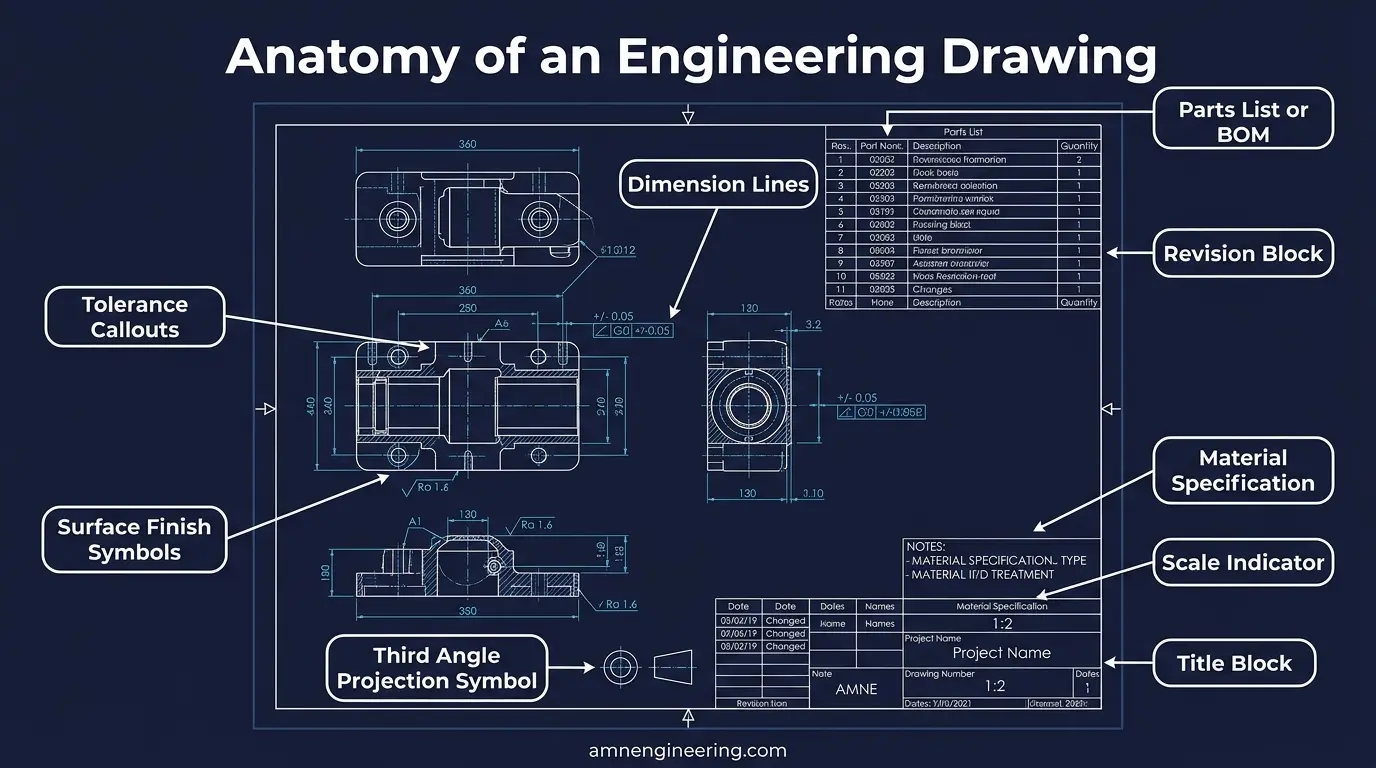
The title block is a rectangular box usually located in the bottom right corner of the drawing. It is the first thing you should read because it contains information that applies to the entire part.
What the Title Block Contains
| Field | What It Means | Example |
|---|---|---|
| Part Name | Description of the component | Drive Shaft Assembly |
| Part Number | Unique identifier for ordering and tracking | AMN-2026-0453 |
| Material | The type of metal or material required | EN24 Steel (817M40) |
| Scale | How the drawing relates to actual size | 1:1 (full size), 2:1 (twice actual) |
| Projection | First angle or third angle (how views are arranged) | Third Angle |
| General Tolerance | Default tolerance for dimensions without specific callouts | ±0.1mm |
| Surface Finish | Default surface finish unless otherwise noted | Ra 3.2 unless noted |
| Revision | Current version of the drawing | Rev C |
| Drawn By / Approved By | Who created and approved the drawing | J. Ahmed / A. Nawaz |
The general tolerance is especially important. It applies to every dimension on the drawing that does not have its own specific tolerance callout. If the general tolerance says ±0.1mm, then a dimension shown as 50.00 means the part must be between 49.9mm and 50.1mm.
Understanding Views and Projections
An engineering drawing shows a 3D part as multiple 2D views. The most common views are:
- Front View is the main view that shows the most important features of the part. It is usually the largest view on the drawing.
- Top View shows the part as seen from above.
- Side View (right or left) shows the part from the side.
- Section Views cut through the part to show internal features like holes, bores, or cavities. These are marked with cutting plane lines and labeled (for example, Section A-A).
First Angle vs Third Angle Projection
The projection system tells you how the views are arranged around the front view. Look for the projection symbol in the title block:
Third angle projection (common in North America): The top view is above the front view, and the right side view is to the right. Think of it as the view is on the side you are looking from.
First angle projection (common in Europe and Asia): The top view is below the front view, and the right side view is to the left. Think of it as the view lands on the opposite side.
Getting this wrong means you could read a left side view as a right side view, which leads to manufacturing errors.
How to Read Dimensions on a Drawing
Dimensions tell you the exact size of every feature on the part. They are shown as numbers with arrows pointing to the surfaces they measure.
Types of Dimensions
- Linear dimensions measure straight distances: length, width, height, depth. Example: 75.00mm between two parallel surfaces.
- Diameter dimensions are shown with the symbol Ø before the number. Example: Ø25.00mm means a round hole or shaft that is 25mm across.
- Radius dimensions are shown with the letter R before the number. Example: R5.0mm means a curved corner with a 5mm radius.
- Angular dimensions measure angles between surfaces. Example: 45° chamfer.
Dimension Rules to Remember
All dimensions on a drawing are in the unit specified in the title block (usually millimeters). If no unit is stated, check with the manufacturer before assuming. Some older drawings from the USA use inches, and confusing millimeters with inches is a costly mistake.
Dimensions should be read in the direction of the dimension line arrows. Each dimension appears once. If a dimension seems to be missing, check other views because it may be shown on a different view of the same part. For help getting your files ready before you quote, see our guide on how to prepare a CAD file for CNC manufacturing.
Tolerances: What Plus and Minus Numbers Mean
Tolerances define how much a dimension is allowed to vary from the target value. They are the difference between a part that fits and one that does not.
Types of Tolerances
- Bilateral tolerance allows variation in both directions. Example: 50.00 ±0.05mm means the part can be anywhere from 49.95mm to 50.05mm.
- Unilateral tolerance allows variation in only one direction. Example: 50.00 +0.00 / +0.05mm means the part can be 50.00mm to 50.05mm but not smaller.
- Limit dimensions show the maximum and minimum directly. Example: 50.05 / 49.95mm.
How Tolerances Affect Cost
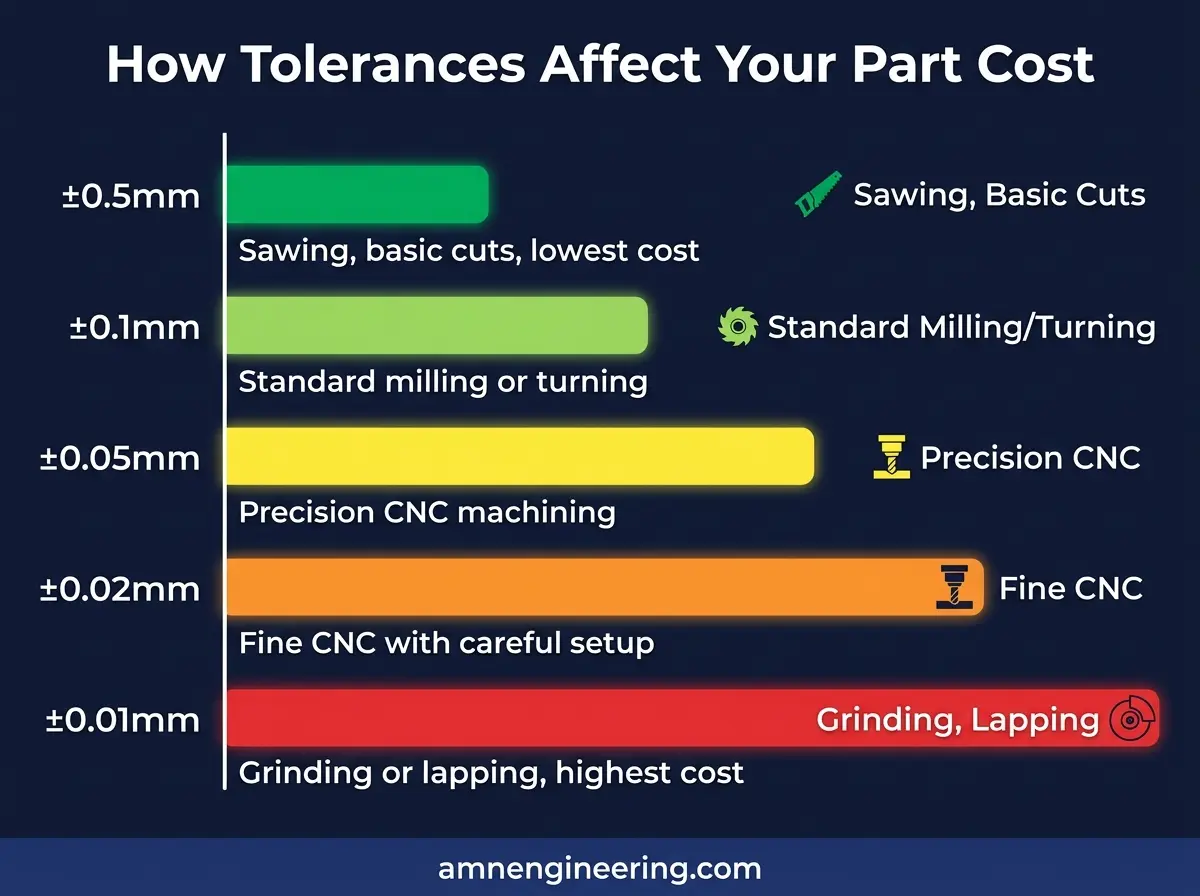
Tighter tolerances require more precise machines, slower cutting speeds, and additional inspection. Here is a general guide for CNC machining:
| Tolerance Range | Difficulty | Cost Impact |
|---|---|---|
| ±0.5mm to ±0.1mm | Standard machining | Base cost |
| ±0.1mm to ±0.05mm | Precision machining | 10% to 20% more |
| ±0.05mm to ±0.02mm | High precision | 25% to 50% more |
| ±0.02mm to ±0.01mm | Requires grinding | 50% to 100% more |
If your drawing has very tight tolerances on every dimension, your manufacturer will need to use slower feeds, finer tools, and more inspection time. Only apply tight tolerances to surfaces that actually need them (mating surfaces, bearing seats, seal grooves) and leave other surfaces at general tolerance.
For a visual sense of what each tolerance band looks like in practice, see our machining tolerance visual guide.
Surface Finish Symbols Explained Simply
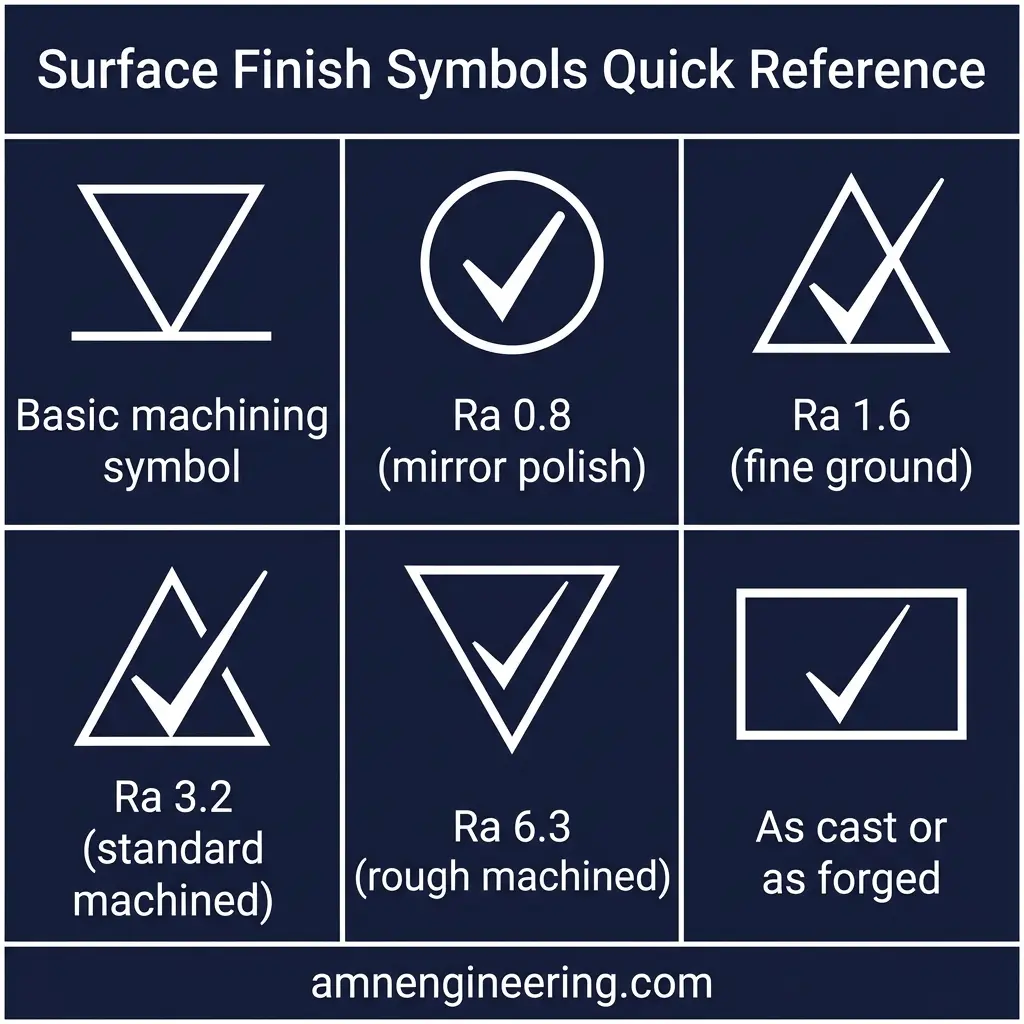
The surface finish symbol looks like a checkmark with a number next to it. The number tells the manufacturer how smooth the surface must be, measured in Ra (Roughness Average) in micrometers (µm).
Common Surface Finish Values
| Ra Value | Description | How It Is Achieved |
|---|---|---|
| Ra 12.5 | Rough machined or saw cut | Basic cutting operations |
| Ra 6.3 | Standard machined | Normal CNC turning or milling |
| Ra 3.2 | Fine machined | Finish passes with sharp tooling |
| Ra 1.6 | Very smooth machined | Fine finish cuts, careful feed rates |
| Ra 0.8 | Ground finish | Surface or cylindrical grinding |
| Ra 0.4 | Fine ground or lapped | Precision grinding |
A smoother surface finish costs more to produce. Only specify fine finishes (Ra 1.6 or below) on surfaces where it matters, such as bearing seats, sealing surfaces, or sliding contacts. To understand how Ra relates to Rz and other roughness parameters, read surface roughness Ra and Rz explained.
Material Callouts and What They Tell You
The material specification on the drawing tells the manufacturer exactly which metal to use. It is usually shown in the title block and sometimes repeated in a note on the drawing itself.
Common Material Specifications
- EN8 (080M40): Medium carbon steel. Good strength, easy to machine. Used for shafts, studs, and general purpose components.
- EN24 (817M40): High strength alloy steel. Heat treatable to high hardness. Used for gears, heavy duty shafts, and high stress parts.
- SS304 (1.4301): Austenitic stainless steel. Corrosion resistant. Used for food processing, chemical, and marine applications.
- SS316 (1.4401): Higher corrosion resistance than 304. Used in marine, pharmaceutical, and chemical environments.
- Mild Steel (EN3/S275): Low carbon steel. Easy to weld and form. Used for structural components and metal fabrication.
If a drawing says material as per customer specification or the material field is blank, always clarify with the buyer or designer before manufacturing. Using the wrong material is one of the most expensive mistakes in manufacturing. When your parts arrive, the material test certificate is how you confirm the correct grade was used.
GD&T Basics Every Buyer Should Know
GD&T (Geometric Dimensioning and Tolerancing) is a system of symbols that controls the geometry of features beyond simple size tolerances. You will see these symbols inside rectangular frames called feature control frames.
The Five Most Common GD&T Symbols
| Symbol | Name | What It Controls |
|---|---|---|
| Runout arrows | Concentricity / Runout | How well a shaft runs true when rotated |
| Perpendicular symbol | Perpendicularity | How square a surface is to a reference surface |
| Parallel lines | Parallelism | How parallel a surface is to a reference surface |
| Open circle | Circularity (Roundness) | How round a circular feature is |
| Position crosshair | Position | How accurately a hole or feature is located |
As a buyer, you do not need to master every GD&T symbol. But you should know that GD&T callouts usually indicate critical features that need precise manufacturing and inspection. Parts with GD&T requirements often need CMM (Coordinate Measuring Machine) inspection, which adds to the cost.
Common Drawing Notes and What They Mean
Drawings often include text notes that provide additional manufacturing instructions. Here are the most common ones:
- All edges to be deburred means the manufacturer must remove all sharp edges from the part. This is standard practice for safety and function.
- Break all sharp edges 0.5 x 45° means all edges should have a small 0.5mm chamfer at 45 degrees.
- Surface treatment: hot dip galvanize to BS EN ISO 1461 means the part needs galvanizing after machining.
- Heat treat to 280 to 320 BHN means the part needs heat treatment to achieve a specific hardness range.
- Do not scale drawing means you should use only the written dimensions, not measurements taken from the drawing itself.
- All dimensions in mm unless stated otherwise confirms the unit system.
Read every note on the drawing before requesting a quote. Missing a note about heat treatment or surface coating can significantly change the price and lead time. Our RFQ tips for manufacturing cover what else to include so your quote comes back fast and accurate.
What to Do If You Do Not Have a Drawing
Not every buyer has a formal engineering drawing. If you have a sample part, a rough sketch, or even just an idea, a good contract manufacturer can help you turn that into a proper drawing.
At AMN Engineering, we regularly work with buyers who provide:
- A physical sample part that we measure and reverse engineer to create a drawing.
- A hand sketch with approximate dimensions that we formalize into a proper drawing for approval.
- A 3D CAD model (STEP or IGES format) that we use directly for CNC programming while creating the inspection drawing ourselves.
- Photos with measurements that we use as a starting point and clarify any missing details before manufacturing.
For flat sheet metal parts, a DXF file is all we need to start laser cutting. The key is clear communication: the more information you provide upfront, the faster and more accurate your quote will be.
Frequently Asked Questions
The title block is the most important part because it contains the part name, part number, material specification, general tolerances, scale, and revision history. Without reading the title block first, you may miss critical requirements that apply to the entire drawing.
The surface finish symbol (a checkmark shape with a number) tells the manufacturer how smooth a surface must be. The number is measured in Ra (roughness average) in micrometers. A lower number means a smoother surface. For example, Ra 1.6 is a standard machined finish and Ra 0.4 requires precision grinding.
First angle projection is used mainly in Europe and Asia. The views are arranged as if the object is placed between you and the projection plane. Third angle projection is used mainly in North America. The views are arranged as if the object is behind the projection plane. The symbol in the title block tells you which system is used.
GD&T stands for Geometric Dimensioning and Tolerancing. It is a system of symbols that controls the shape, orientation, and location of features beyond simple plus or minus tolerances. Buyers should understand basic GD&T because it affects manufacturing cost and method. Tight GD&T requirements may require additional operations like grinding or inspection with CMM equipment.
For CNC machining, STEP (.stp) and IGES (.igs) 3D files work best along with a 2D PDF drawing showing dimensions and tolerances. For laser cutting, DXF files are the standard format. Always include a 2D drawing with dimensions even if you are sending a 3D model, because tolerances and surface finish requirements are usually only shown on the 2D drawing.